Best Wireless Computer Mouses of 2026: 10 Compared

Ten wireless mice, and barely two of them solve the same problem. Some chase a featherweight gaming sensor; others care only about a battery you can forget for a year or more. A few bend the shell into a vertical wedge to spare your wrist. The right one isn't the one with the fattest spec sheet — it's the one whose trade-offs line up with how your hand spends its day.
Picking a wireless mouse sounds trivial until you notice how differently these ten models are built. The acer Wireless Mouse leans on simple 2.4GHz reliability and a visible DPI indicator; the Logitech M510 trades on a seven-button layout and a 24-month battery claim; the Logitech G PRO X Superlight 2 throws a 44,000 DPI Hero 2 sensor and 8kHz polling at competitive players who count milliseconds. Connection style alone splits the field — pure 2.4GHz dongles, Bluetooth-plus-receiver hybrids, and a couple that juggle up to three paired devices at once. We compared all ten on the specs buyers actually weigh: connection type, DPI flexibility, button count, battery approach, ergonomics, and weight, then scored each against its price. The ranking reflects how much capability you get for the money, not raw feature totals. Below: quick picks up top, a side-by-side look at the numbers, and an honest read on where each mouse shines and where it falls short, so you can match one to your desk instead of guessing.
The short version: The acer Wireless Mouse takes the top spot in our 10-mouse comparison, earning it on a clean plug-and-play 2.4GHz setup, three switchable DPI steps, and a low-battery indicator light at a price that undercuts almost everything else here. If you want a recharge-and-go vertical that eases wrist angle, the ProtoArc Ergonomic Mouse is our standout value pick.
- Across all 10 mice, our #1 overall is the acer Wireless Mouse for its plug-and-play 2.4GHz link, three-level DPI, and low-battery indicator light.
- Battery strategy splits the field: the Logitech M510 claims a 24-month run on AA, while the ProtoArc recharges over its Type-C cable and the Uineer goes rechargeable too.
- For the longest battery commitment, the Razer Naga V2 HyperSpeed cites up to 400 hours on Bluetooth, and the Redragon and Hotweems each run a single AA up to roughly 18 months.
- Gamers get the most headroom from the Logitech G PRO X Superlight 2 (44,000 DPI Hero 2 sensor, 8kHz polling) and the Razer Naga V2 HyperSpeed with its 19 programmable buttons.
- Wrist-conscious buyers should look at the vertical ProtoArc Ergonomic Mouse or the 30-degree Hotweems Wireless Mouse.
Our Top 3 Picks

- Plug-and-play 2.4GHz link, stable up to 32 feet
- Three adjustable DPI levels (800, 1200, 1600)
- Six buttons with forward and back navigation
- Indicator light for DPI level and low battery
- Smart sleep mode wakes on 2-3 clicks

- Vertical shape keeps the wrist naturally straight
- Pairs up to three devices via Bluetooth and 2.4G Usb-a
- 500mAh rechargeable Li-Ion battery, Type-C charging
- Optical tracking for Windows and Mac OS
- Sized for hand lengths under 7.5 inches

- Driver-free 2.4GHz connection up to 33 feet (10m)
- Five-level adjustable DPI up to 4000
- Six buttons for navigation and control
- Single AA battery rated up to 18 months
- Anti-slip, anti-sweat compact-medium body
Full Comparison — All 10 Computer Mouse
| Image | Product | Features | Price |
|---|---|---|---|
Editor's Choice |
| Check Price on Amazon Read Full Review | |
Best Value |
| Check Price on Amazon Read Full Review | |
Premium Pick |
| Check Price on Amazon Read Full Review | |
 |
| Check Price on Amazon Read Full Review | |
 |
| Check Price on Amazon Read Full Review | |
 |
| Check Price on Amazon Read Full Review | |
 |
| Check Price on Amazon Read Full Review | |
 |
| Check Price on Amazon Read Full Review | |
 |
| Check Price on Amazon Read Full Review | |
 |
| Check Price on Amazon Read Full Review |
How They Compare
Top picks — strengths at a glance
Brands compared
All 10, Reviewed
This is the one most desks actually need: a 2.4GHz connection that just works, three DPI steps to dial in sensitivity, and a small light that tells you the DPI level and warns when the battery's low. Six buttons cover forward/back browsing, and a smart sleep mode parks it after 10 idle minutes, waking on a couple of clicks. It tops our list because it nails the everyday essentials without padding the price.
- Plug-and-play 2.4GHz link, stable up to 32 feet
- Three adjustable DPI levels (800, 1200, 1600)
- Six buttons with forward and back navigation
- Indicator light for DPI level and low battery
- Single 2.4GHz receiver only, with no Bluetooth option like the Tecknet
- Tops out at 1600 DPI, below the Redragon's 4000 DPI ceiling
Built for people whose wrists complain by mid-afternoon, the EM11 NL stands the mouse upright to keep the forearm and wrist in a more natural line. It pairs three ways — dual Bluetooth plus a 2.4G Usb-a receiver — for up to three devices at once, and a 500mAh Li-Ion pack recharges over the included Type-C cable. Tuned for hand lengths under 7.5 inches, it's our value pick for anyone prioritizing comfort over a thin profile.
- Vertical shape keeps the wrist naturally straight
- Pairs up to three devices via Bluetooth and 2.4G Usb-a
- 500mAh rechargeable Li-Ion battery, Type-C charging
- Optical tracking for Windows and Mac OS
- Heaviest mouse here at about 0.551 lb
- Designed for hands under 7.5 inches, so larger palms may find it small
Driver-free and quick to set up, the Redragon runs a 2.4GHz link out to about 33 feet and leans hard on efficiency — a single AA cell is rated to last up to 18 months. You get five DPI levels reaching 4000 and six buttons, wrapped in an anti-slip, anti-sweat compact-medium shell. For buyers who want real DPI range and a marathon battery without spending much, it lands near the top.
- Driver-free 2.4GHz connection up to 33 feet (10m)
- Five-level adjustable DPI up to 4000
- Six buttons for navigation and control
- Single AA battery rated up to 18 months
- Lacks the Bluetooth multi-device pairing the ProtoArc offers
- AA cell is not included in the box
The M510 is the comfort-and-control veteran of this group, shaped to let your hand relax through long stretches and outfitted with a seven-button layout for faster work. Its 1000 DPI laser-grade tracking pairs with the tiny Logitech Unifying receiver that can stay parked in your laptop, and Logitech rates the battery at roughly two years. It sits mid-pack as a steadier, more button-rich pick for people who value a familiar full-size shape.
- Ergonomic shape built for long, relaxed sessions
- Seven buttons for added control
- 1000 DPI laser-grade tracking
- Battery life rated around 24 months
- 1000 DPI ceiling trails the 4000 DPI Redragon and Tecknet
- Heavier than most here at about 0.28 lb
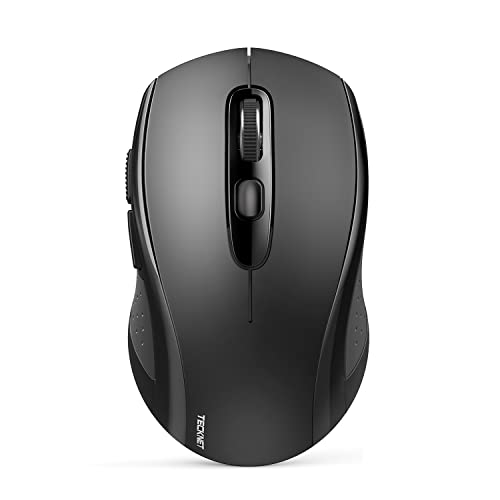
TECKNET's pitch is flexibility: switch between two devices across BT5.0, BT3.0, and a 2.4GHz USB receiver, so it hops from laptop to tablet on the fly. Six DPI levels span 800 to 4000, the click is engineered to stay quiet, and the contoured 2-in-1 shell keeps it portable. At its place in our ranking it's a strong value play for anyone who wants Bluetooth versatility without paying premium money.
- Three modes: BT5.0, BT3.0, and 2.4GHz
- Switches between two devices instantly
- Six DPI levels (800/1200/1600/2400/3200/4000)
- Silent click design
- Pairs two devices at once, one fewer than the ProtoArc's three
- Lacks the rechargeable battery of the ProtoArc and Uineer
The Uineer keeps things simple and refillable: a 2.4GHz link with minimal interference, a rechargeable battery so you skip cell swaps, and a visible battery-level readout so you're never caught off guard. Four DPI settings (800-1200-1600-2400) cover typical sensitivity needs, and it's compatible across Windows, Mac, and Linux. A practical mid-list pick for anyone who wants rechargeable convenience on a modest budget.
- Stable 2.4GHz connection with minimal interference
- Rechargeable battery, no cell swapping
- Visible battery-level display
- Four DPI levels (800-1200-1600-2400)
- Four DPI levels trail the Redragon's five and TECKNET's six
- Single 2.4GHz mode, without the ProtoArc's Bluetooth pairing
At roughly 0.066 lb, the M185 is the lightest mouse on this list — an easy throw-in-the-bag companion. Its contoured ambidextrous shell suits left or right hands, the nano USB receiver gets you working in seconds out to about 33 feet, and a smart sleep mode stretches battery life toward a year. It ranks where it does as a dependable, no-frills travel mouse that works across PC, Mac, and laptops.
- Lightest here at about 0.066 lb
- Ambidextrous shape for either hand
- Up to one year of battery life with smart sleep
- Nano USB receiver, reliable up to 33 feet (10m)
- 1000 DPI tracking sits below the Redragon's 4000 DPI
- Single-device receiver, without the TECKNET's Bluetooth switching
This is the spec ceiling of the group. The Superlight 2 carries a Hero 2 sensor tracking over 888 IPS and up to 44,000 DPI with zero smoothing, paired with 8kHz polling and Usb-c charging for a 60g, pro-grade body. Lightforce hybrid switches and zero-additive Ptfe feet round out a mouse engineered with esports pros in mind. It ranks here as the clear premium choice — overkill for casual use, exactly right for competitive play.
- Hero 2 sensor up to 44,000 DPI, 888+ IPS
- 8kHz polling rate
- 60g pro-grade body with five programmable buttons
- Lightforce hybrid switches
- Five programmable buttons, far fewer than the Razer Naga V2's 19
- Specialized for gaming, more than office buyers need
Hotweems angles the D-09 to a 30-degree handshake position meant to ease muscle strain over long stretches. A 2.4GHz link reaches about 33 feet with reduced lag, five DPI steps run 800 to 2400 for less hand movement, and a single AA cell is rated up to 18 months. The body is rated for 50 million clicks. It sits lower in our ranking but stays a comfortable, long-lasting budget option.
- 30-degree ergonomic handshake angle
- 2.4GHz connection up to 33 feet (10m)
- Five DPI levels (800/1200/1600/2000/2400)
- Single AA battery rated up to 18 months
- Tops out at 2400 DPI, below the Redragon's 4000 DPI
- Single 2.4GHz mode, without Bluetooth like the Tecknet
The Naga V2 HyperSpeed is purpose-built for command-heavy gaming, stacking 19 programmable buttons within reach of the thumb for mapping out an MMO's essentials. It connects via Razer HyperSpeed 2.4GHz or Bluetooth, adds HyperScroll for free-spin scrolling, and tracks with the Focus Pro 30K optical sensor — even across glass. Battery runs up to 400 hours on Bluetooth. It rounds out the field as the specialist pick for players who live by macros.
- 19 programmable buttons for MMO commands
- HyperSpeed 2.4GHz and Bluetooth connectivity
- HyperScroll technology for free-spin scrolling
- Focus Pro 30K optical sensor, tracks on glass
- Focus Pro 30K sensor tops below the Superlight 2's 44,000 DPI
- Button-heavy MMO layout is more than general users need
8 Things to Consider Before Buying Computer Mouse
A wireless mouse lives or dies on the fit between its real features and your daily grip, surface, and tolerance for charging. Before you sort by price, walk the factors below — connection method, DPI range, battery strategy, button count, ergonomics, and weight — because the cheapest pick and the right pick are rarely the same mouse. Our ranking already balances these trade-offs, so a higher slot means a stronger score for the money.
Our Final Verdict
The acer Wireless Mouse earns our top overall slot by nailing the basics — stable 2.4GHz connection, three DPI steps, a low-battery indicator — without padding the price. For the best value, the ProtoArc Ergonomic Mouse delivers a rechargeable vertical shape and triple-device pairing that punch above their cost. If you want the premium ceiling, the Logitech G PRO X Superlight 2 Wireless Gaming Mouse brings a 44,000 DPI Hero 2 sensor, 8kHz polling, and a roughly 0.132 lb body built for esports — far more mouse than an office user needs, but the right call for competitive play. Most buyers, though, will be happiest somewhere between the acer and ProtoArc.
Frequently Asked Questions
Which wireless mouse is the best overall?
The acer Wireless Mouse leads our comparison of 10 models. It pairs a stable 2.4GHz connection rated up to 32 feet with three adjustable DPI levels (800, 1200, 1600), six buttons including forward and back, and an indicator light for DPI level and low battery — a well-rounded everyday setup that scored highest for the money.
Should I get a rechargeable mouse or one that uses AA batteries?
It depends on whether you'd rather swap a cell or hunt for a cable. The Redragon Wireless Mouse and Hotweems Wireless Mouse run on a single AA rated up to 18 months, and the Logitech M510 claims 24 months, so downtime is a quick battery swap. The ProtoArc Ergonomic Mouse and Uineer Wireless Mouse instead recharge over Usb-c, which means no battery buying but occasional plug-in time.
Is a high-DPI gaming mouse worth it for office work?
Usually not. The Logitech G PRO X Superlight 2's 44,000 DPI Hero 2 sensor and 8kHz polling are built for competitive gaming, where tracking speed and report rate matter. For browsing, documents, and spreadsheets, the acer Wireless Mouse's three DPI steps or the Redragon's 5-level 4000 DPI cover the sensitivity range most people ever touch.
Which mouse is best if I have wrist or hand strain?
Look at the vertical and angled designs. The ProtoArc Ergonomic Mouse uses a vertical shape to keep the wrist naturally straight and is built for hand lengths under 7.5 inches, while the Hotweems Wireless Mouse builds in a 30-degree handshake angle. If you prefer a traditional shape, the ambidextrous Logitech M185 fits either hand comfortably.
Can these mice connect to more than one device?
Several can. The ProtoArc Ergonomic Mouse pairs up to three devices using Bluetooth plus a 2.4GHz Usb-a receiver, the Tecknet Bluetooth Mouse switches between two devices across BT5.0, BT3.0, and 2.4GHz, and the Razer Naga V2 HyperSpeed offers both HyperSpeed 2.4GHz and Bluetooth. Single-receiver models like the acer and Redragon connect to one machine at a time.
Do I need a USB port free, or will Bluetooth work?
Both paths exist here. Receiver-based mice such as the acer Wireless Mouse, Redragon, and Logitech M185 use a small 2.4GHz USB dongle, so you'll want a free Usb-a port. If ports are scarce, the Tecknet Bluetooth Mouse and ProtoArc connect over Bluetooth directly, with a 2.4GHz receiver still available as a fallback.
Related Guides


