Best Digital Picture Frames of 2026: 10 Compared

A digital frame earns its spot on the wall by how easily photos land on it from a phone three states away, not by the box it shipped in. The ten frames we ranked split into two honest camps: roomy 15.6-inch panels meant to anchor a kitchen or hallway, and compact 10.1-inch units that slip onto a nightstand or shelf. Picking well means deciding which job yours has to do before you ever look at a spec sheet.
Most digital frames sold today do the same headline trick: someone snaps a photo, taps share in an app, and it shows up on grandma's frame seconds later. Where they diverge is screen size, storage, the app behind the sharing, and how far each one stretches past being just a frame. Our ten span 10.1-inch and 15.6-inch panels, with built-in memory ranging from 16GB up to the 64GB on the Linkdaze Digital Calendar, plus three different sharing ecosystems, Frameo, AiMOR, and Linkdaze's own calendar sync. To assemble this guide we pulled the current Amazon specifications, images, and listings for the ten most relevant digital frames, then scored each on capability, value, and how cleanly it fits a real use case, whether that is a gift for a parent or a command center for a busy household. The recurring themes, instant app sharing, IPS touch displays, auto-rotate, and non-WiFi transfer on several models, shaped how we ranked them. Start with the verdict if you are short on time; the per-product breakdowns below get into the specifics.
The short version: The Linkdaze Digital Calendar 15.6" Digital Wall Planners takes our top spot: it pairs a 1920x1080 interactive touchscreen and 64GB of built-in memory with calendar sync across Google, iCloud, and Outlook, then folds in a meal planner and a photo-frame mode. For getting the essentials cheaply, the Aeezo Digital Picture Frame is the value pick, with its 1280x800 IPS touchscreen, gravity and light sensors, and AiMOR app sharing.
- The Linkdaze Digital Calendar ranks first on capability: 1920*1080 touchscreen, 64GB built-in memory, calendar sync, meal planner, and a photo-frame mode in one unit.
- The Aeezo Digital Picture Frame is the value choice, with a 1280x800 IPS touchscreen, gravity and light sensors, and AiMOR app sharing.
- Screen size splits the field cleanly: 15.6-inch panels (Linkdaze Digital Calendar, Pastigio, Flyruit) for walls and counters, 10.1-inch frames for desks and shelves.
- Sharing runs on three ecosystems here, Frameo, AiMOR, and Linkdaze's calendar sync, so match the app to whoever will actually use the frame.
- If the recipient dislikes apps, the Pastigio 15.6", Flyruit 15.6", and Pastigio 10.1" each support non-WiFi photo transfer.
Our Top 3 Picks

- 1920*1080 interactive touchscreen
- 64GB built-in memory, the most here
- Syncs Google, iCloud, and Outlook calendars
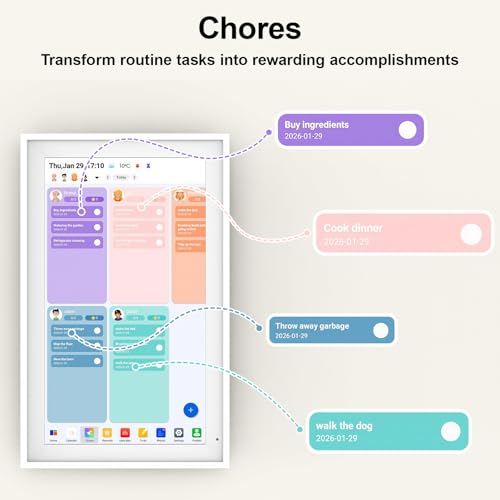
- Built-in meal planner and chores feature
- Doubles as an HD digital photo frame

- 1280x800 HD IPS touchscreen with adjustable brightness
- Gravity sensor auto-rotates photo orientation
- Light sensor adapts brightness to the room
- 32GB built-in memory
- Shares photos via the AiMOR app from anywhere

- 15.6-inch 1920x1080 IPS HD touch screen
- Instant sharing through the Frameo app
- React feature sends emojis back in real time
- Supports non-WiFi transmission
- Mounts on a wall or stands on a table
Full Comparison — All 10 Picture Frames
| Image | Product | Features | Price |
|---|---|---|---|
Editor's Choice |
| Check Price on Amazon Read Full Review | |
Best Value |
| Check Price on Amazon Read Full Review | |
Premium Pick |
| Check Price on Amazon Read Full Review | |
 |
| Check Price on Amazon Read Full Review | |
 |
| Check Price on Amazon Read Full Review | |
 |
| Check Price on Amazon Read Full Review | |
 |
| Check Price on Amazon Read Full Review | |
 | 8Jiugedpf Smart White Digital Picture Frame WiFi Send Photos |
| Check Price on Amazon Read Full Review |
 |
| Check Price on Amazon Read Full Review | |
 |
| Check Price on Amazon Read Full Review |
How They Compare
Top picks — strengths at a glance
Brands compared
All 10, Reviewed
1 Linkdaze Digital Calendar 15.6" Digital Wall Planners
This is the rare digital frame that wants to run your household, not just decorate it. The Linkdaze Digital Calendar pulls Google, iCloud, and Outlook calendars together on a 1920*1080 interactive touchscreen, adds a built-in meal planner and a chores feature, then drops into a digital photo-frame mode in HD between busy stretches. Its 64GB of built-in memory is the largest in this group, which is why it tops our ranking on sheer capability.
- 1920*1080 interactive touchscreen
- 64GB built-in memory, the most here
- Syncs Google, iCloud, and Outlook calendars
- Built-in meal planner and chores feature
- The 15.6-inch size needs wall or counter space, not a small desk
- Built around calendar sync, so overkill if you only want a photo frame
2 Aeezo Digital Picture Frame
If you want photo sharing without paying for calendar gadgetry, the Aeezo is the smart buy. Its 10.1-inch 1280x800 HD IPS touchscreen reproduces detail with adjustable brightness, and a built-in light sensor nudges that brightness to match the room. A gravity sensor auto-rotates shots so portraits and landscapes both sit right. Photos arrive through the AiMOR app from anywhere, which earns it our value pick.
- 1280x800 HD IPS touchscreen with adjustable brightness
- Gravity sensor auto-rotates photo orientation
- Light sensor adapts brightness to the room
- 32GB built-in memory
- Lacks the calendar sync and meal planner of the top pick
- 1280x800 resolution sits below the 1920x1080 large-screen frames
3 Pastigio Digital Picture Frame
For families who want a large screen and two-way interaction, the Pastigio 15.6" delivers. Its 1920x1080 IPS panel renders vivid color across the wide display, and the Frameo app handles instant sharing. The standout is the React feature, which sends emojis back to whoever shared a photo in real time. It also supports non-WiFi transfer for relatives who find apps a hassle, which is why it earns the premium nod.
- 15.6-inch 1920x1080 IPS HD touch screen
- Instant sharing through the Frameo app
- React feature sends emojis back in real time
- Supports non-WiFi transmission
- Lacks the calendar sync and meal planner the Linkdaze Digital Calendar offers
- The large 15.6-inch size suits a counter or wall, not a compact shelf
4 MaxAngel Frameo 10.1 Inch WiFi Digital Picture Frame
The MaxAngel covers the compact-frame basics and adds a touch more. Its 10.1-inch IPS panel runs at 1280x800 for true-to-life clarity, with 32GB of storage and auto-rotate handling mixed orientations. Photos and videos up to 15 seconds reach it through the Frameo app over WiFi, and it can sync a calendar to track daily plans and events, a small step toward the hub features the top picks lean on.
- 10.1-inch IPS HD touch screen at 1280x800
- 32GB built-in storage
- Auto-rotate for portrait and landscape
- Frameo app sharing for photos and 15-second videos
- 1280x800 resolution trails the 1920x1080 large-screen frames
- 10.1-inch size is smaller than the 15.6-inch wall frames
5 Nettips Digital Photo Frame
The Nettips frame stands out for flexibility on storage. Alongside its 10.1-inch 1280x800 IPS touch screen and Frameo sharing over WiFi, it carries 16GB built in and supports Micro SD cards up to 32GB, so you can bulk-load photos instead of trickling them through an app. Auto-rotate keeps mixed galleries upright, and it works on both Android and iOS, making it a straightforward gift.
- 10.1-inch 1280x800 IPS touch screen
- 16GB storage plus Micro SD support up to 32GB
- Auto-rotate for any angle
- Frameo sharing on Android and iOS
- 16GB built-in storage is below the 32GB on most rivals here
- 1280x800 resolution sits under the 1920x1080 large-screen models
6 Flyruit Digital Picture Frame
The Flyruit 15.6" makes its case on a large 1080p Full HD display that brings photos to life across the wide IPS panel, paired with 32GB of storage and Frameo sharing. A Greeting feature lets you send themed birthday wishes, and non-WiFi transfer covers relatives who'd rather skip the app. At roughly 3.5 pounds it's the heaviest frame here, so plan a sturdy mount or surface.
- 15.6-inch 1080p Full HD IPS touchscreen
- 32GB of storage
- Frameo app for instant photo and video sharing
- Greeting feature for themed birthday wishes
- At about 3.5 lb it's the heaviest frame in this lineup
- Lacks the calendar sync and meal planner of the Linkdaze Digital Calendar
7 Flyruit Digital Picture Frame
This is the small-screen version of Flyruit's family-sharing frame. The Flyruit 10.1" runs a 1280x800 HD touchscreen with 32GB of storage and the Frameo app, and at about 1.7 pounds it's light enough for a shelf or nightstand. It keeps the Greeting feature for themed wishes and a no-WiFi fallback, trading the bigger 15.6-inch panel for a price and footprint that fit a smaller space.
- 10.1-inch HD touchscreen display
- 32GB of storage
- Frameo app for instant sharing
- Greeting feature for themed wishes
- 1280x800 screen is smaller and lower-res than the 15.6-inch Flyruit
- No calendar sync, unlike the MaxAngel or Linkdaze Digital Calendar
8 Jiugedpf Smart White Digital Picture Frame WiFi Send Photos
The Jiugedpf leans into customization and privacy. Its 10.1-inch 1280x800 HD IPS LCD screen pairs with controls for slideshow mode, playback order, hiding or publishing images, brightness, and a sleep schedule. Photos and videos up to 15 seconds send directly to its app on iOS or Android, billed as instant, private, and safe. Auto-rotate and wall-mounting round out a tidy 16GB frame at about 1.52 pounds.
- 10.1-inch 1280x800 HD IPS LCD screen
- Private, direct app sharing of photos and 15-second videos
- Slideshow mode, playback order, and brightness controls
- Auto-rotate and wall-mountable
- 16GB storage is below the 32GB on most rivals here
- 1280x800 resolution trails the 1920x1080 large-screen frames
9 Pastigio Digital Picture Frame
Pastigio's compact frame puts a little extra into its looks. The 10.1-inch 1280x800 HD touchscreen and 32GB of memory handle the photo basics through the Frameo app, while an award-winning embossed frame design gives it presence on a shelf. Like its larger sibling, it supports non-WiFi transfer for relatives who'd rather skip the setup, and it can be wall-mounted with auto-rotate.
- 10.1-inch 1280x800 HD touchscreen
- 32GB built-in memory
- Frameo app for instant sharing from anywhere
- Embossed frame design
- 1280x800 resolution sits below the 1920x1080 large-screen frames
- 10.1-inch size is smaller than Pastigio's own 15.6-inch model
10 Linkdaze Digital Picture Frame
Linkdaze's 10.1-inch frame is about volume and motion. Its HD IPS touch display runs 1280x800 with vibrant visuals from any angle, and the 32GB of internal storage is rated to hold over 50,000 photos. Beyond stills, it plays 15-second videos with sound to bring moments back to life, and auto-rotate keeps portrait and landscape shots oriented. Sharing goes through the AiMOR app within seconds of a photo being sent.
- 10.1-inch HD IPS touch display at 1280x800
- 32GB storage rated for over 50,000 photos
- Plays 15-second videos with sound
- Auto-rotates portrait and landscape
- 1280x800 resolution trails the 1920x1080 large-screen frames
- Lacks the calendar sync and meal planner of the Linkdaze Digital Calendar
8 Things to Consider Before Buying Picture Frames
Before comparing brands, settle on where the frame will live and what it has to do. Size and storage drive the price, the sharing app dictates how painless gifting will be, and a handful of these frames stretch past photos into calendars and slideshows. The factors below map to the specs that actually differ across these ten.
Our Final Verdict
The Linkdaze Digital Calendar 15.6" Digital Wall Planners is our top pick because it does the most: a 1920*1080 interactive touchscreen, 64GB of memory, calendar sync across Google, iCloud, and Outlook, plus a meal planner and a photo-frame mode rolled into one device. For shoppers who only want clean photo sharing without paying for the extras, the Aeezo Digital Picture Frame is the value pick, leaning on a 1280x800 IPS touchscreen, gravity and light sensors, and the AiMOR app. If your priority is a big screen for sharing photos and videos with family, the Pastigio Digital Picture Frame 15.6" is the premium pick, with its 1920x1080 IPS panel, Frameo sharing, a React feature for sending emojis back, and non-WiFi transfer for less techy relatives. None of these is the wrong call, the right one depends on screen size and how much you want the device to do beyond showing photos.
Frequently Asked Questions
What is the best digital picture frame overall?
The Linkdaze Digital Calendar 15.6" Digital Wall Planners is our number-one pick of the ten frames we compared. It combines a 1920*1080 interactive touchscreen, 64GB of built-in memory, and calendar sync from Google, iCloud, and Outlook, then adds a meal planner and a digital photo-frame mode, so it works as a family hub rather than only a photo display.
Which digital frame is best for a tight budget?
The Aeezo Digital Picture Frame is our value pick. It covers the essentials, a 10.1-inch 1280x800 HD IPS touchscreen, 32GB of built-in memory, plus a gravity sensor for auto-rotate and a light sensor for brightness, and shares photos through the AiMOR app from anywhere.
How do photos actually get onto these frames?
Through a sharing app, which one depends on the frame. The Pastigio, MaxAngel, Nettips, and both Flyruit frames use the Frameo app; the Aeezo and the 10.1-inch Linkdaze use AiMOR; and the Linkdaze Digital Calendar syncs calendars from Google, iCloud, and Outlook. Once connected to WiFi, you send photos from your phone and they appear on the frame.
Can someone load photos without WiFi or an app?
Yes, on some models. The Pastigio 15.6", the Flyruit 15.6", and the Pastigio 10.1" each list support for non-WiFi transmission, which lets you put photos on the frame without setting up WiFi or an app account, handy when gifting to a less tech-comfortable relative.
What screen size should I get?
Match it to the spot. A 15.6-inch frame like the Linkdaze Digital Calendar, Pastigio, or Flyruit suits a wall mount or kitchen counter where people see it from a distance. A 10.1-inch frame, the size used by the Aeezo, MaxAngel, Nettips, Jiugedpf, and others, fits a desk, shelf, or nightstand without dominating the space.
Do these frames play videos, or just still photos?
Many play short videos alongside photos. The MaxAngel and several Frameo-based frames handle clips up to 15 seconds, and the 10.1-inch Linkdaze frame plays 15-second videos with sound. If video matters to you, confirm the specific frame lists it, since the experience leans heavily on the recipient seeing motion, not only posed stills.