Best Wireless Computer Keyboards of 2026: 10 Compared

Cutting the cord on your desk sounds simple until you realize how much hides behind the word "wireless." Across the ten keyboards we lined up here, the gap between a plug-and-play full-size board and a hot-swappable mechanical deck is enormous. The right one depends less on brand loyalty and more on how your fingers actually spend their day.
Wireless keyboards used to mean compromise: laggy connections, batteries that died mid-sentence, mushy keys. That story has changed. The ten boards we ranked span plug-and-play USB receivers, Bluetooth multi-device pairing, and tri-mode setups that swap between 2.4 GHz, Bluetooth, and Usb-c wired. Some lean toward quiet office typing; others bring RGB backlighting, gasket-mounted mechanical switches, and hot-swappable sockets for tinkerers. To assemble this guide we pulled current Amazon specs, images, and pricing for ten of the most relevant wireless keyboards, then scored each on capability, value, and how cleanly it fits a real workflow. Connection type, battery life, layout, and whether a mouse comes bundled did most of the sorting. What follows is the at-a-glance verdict, a model-by-model breakdown, and the honest watch-outs for each one, so you can match a board to your desk instead of guessing from a product photo.
The short version: The Logitech K270 Wireless Keyboard takes our top spot: a no-software full-size board with a 2-year battery life and a 33 ft range that just works the moment you plug in the receiver. For the tightest budget, the Meetion Wireless Keyboard and Mouse pairs a full-size board and wrist rest with an adjustable-DPI mouse, making it our best-value pick.
- The Logitech K270 Wireless Keyboard leads our ranking of 10 wireless boards on the strength of its 24-month battery, full-size layout, and software-free 2.4 GHz setup.
- The Meetion Wireless Keyboard and Mouse is the best value, arriving as a full-size set with a wrist rest and adjustable-DPI mouse.
- Four of the ten are keyboard-and-mouse combos: the Logitech MK540, MK850, MK470, and the Meetion bundle.
- For mechanical typists, the Redragon K689 PRO (custom linear switches, gasket mount) and the Razer BlackWidow V4 TKL HyperSpeed (Orange tactile, hot-swappable) lead the pack.
- Connection options range from a single 2.4 GHz receiver to tri-mode Bluetooth, 2.4 GHz, and Usb-c wired on the Aula 99 and Razer boards.
Our Top 3 Picks

- Full-size layout with number pad and 8 multimedia keys
- 24-month battery life
- No software install, just plug in the USB receiver
- Spill-proof design with durable print characters
- Reliable wireless up to 33 ft

- Low-profile spherically-dished keys for quiet, fluid typing
- Backlight lights as hands approach and adapts to the room
- Usb-c rechargeable, no batteries to replace
- Pairs with up to 3 devices across Windows, macOS, Linux
- Smart Actions shortcuts via Logi Options+

- RGB backlighting
- Rechargeable battery, no disposable cells
- Instant USB-receiver connectivity
- Spill-resistant and durable build
- Works with PC, Mac, PS4, and PS5
Full Comparison — All 10 Computer Keyboards
| Image | Product | Features | Price |
|---|---|---|---|
Editor's Choice |
| Check Price on Amazon Read Full Review | |
Best Value |
| Check Price on Amazon Read Full Review | |
Premium Pick |
| Check Price on Amazon Read Full Review | |
 |
| Check Price on Amazon Read Full Review | |
 |
| Check Price on Amazon Read Full Review | |
 | 6Logitech MK850 Performance Wireless Keyboard and Mouse Combo |
| Check Price on Amazon Read Full Review |
 |
| Check Price on Amazon Read Full Review | |
 |
| Check Price on Amazon Read Full Review | |
 |
| Check Price on Amazon Read Full Review | |
 |
| Check Price on Amazon Read Full Review |
How They Compare
Top picks — strengths at a glance
Brands compared
All 10, Reviewed
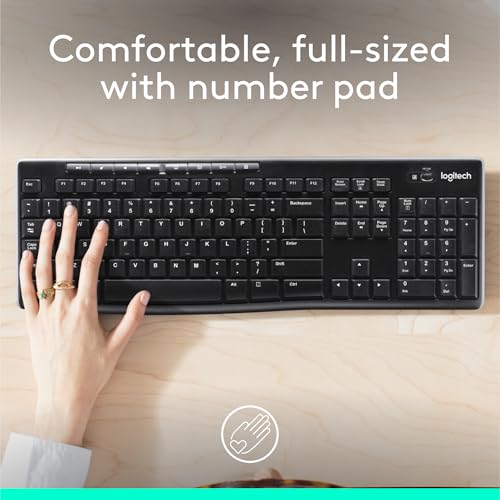
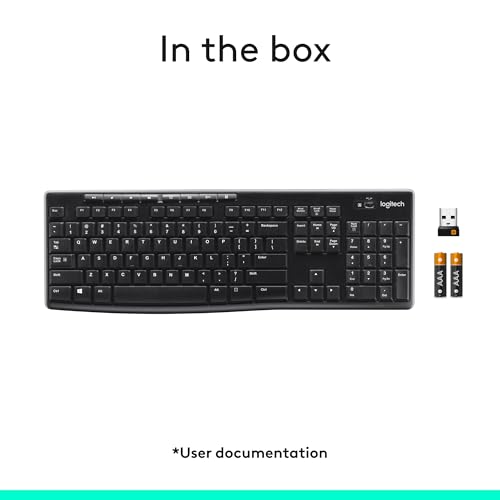
This full-size board earns the top ranking by nailing the fundamentals most desks actually need. The 2.4 GHz connection installs without any software, the deep-profile keys and standard layout feel instantly familiar, and a 24-month battery life keeps it running with no fuss. A spill-proof design and durable printed characters round out a board built to outlast cheaper rivals.
CONS
- Full-size layout with number pad and 8 multimedia keys
- 24-month battery life
- No software install, just plug in the USB receiver
- Spill-proof design with durable print characters
- Reliable wireless up to 33 ft
- Full-size layout with number pad and 8 multimedia keys
- 24-month battery life
- No software install, just plug in the USB receiver
- Spill-proof design with durable print characters
- No backlighting, unlike the Klim Chroma or MX Keys S
- Single-device 2.4 GHz only, no Bluetooth multi-device pairing
Logitech's MX Keys S aims squarely at productivity, with spherically-dished keys shaped to your fingertips for fast, quiet typing. It pairs with up to three devices over Bluetooth or the Logi Bolt receiver and recharges via Usb-c, so there are no batteries to mind. Smart Actions shortcuts and proximity-sensing backlight, both managed through Logi Options+, push it above the plug-and-play crowd, which is why it sits at #2.
CONS
- Low-profile spherically-dished keys for quiet, fluid typing
- Backlight lights as hands approach and adapts to the room
- Usb-c rechargeable, no batteries to replace
- Pairs with up to 3 devices across Windows, macOS, Linux
- Smart Actions shortcuts via Logi Options+
- Low-profile spherically-dished keys for quiet, fluid typing
- Backlight lights as hands approach and adapts to the room
- Usb-c rechargeable, no batteries to replace
- Pairs with up to 3 devices across Windows, macOS, Linux
- No bundled mouse, unlike the MK850 combo
- No number pad mentioned, unlike the full-size K270
The Klim Chroma brings color to a budget price, lighting your desk with RGB backlighting while a rechargeable battery skips disposable cells entirely. Its membrane keys are pitched at faster, quieter typing, and a spill-resistant, water-resistant build adds durability. Compatibility stretches across PC, Mac, PS4, and PS5, which helps it land at #3.
CONS
- RGB backlighting
- Rechargeable battery, no disposable cells
- Instant USB-receiver connectivity
- Spill-resistant and durable build
- Works with PC, Mac, PS4, and PS5
- RGB backlighting
- Rechargeable battery, no disposable cells
- Instant USB-receiver connectivity
- Spill-resistant and durable build
- Membrane keys rather than the mechanical switches on the Redragon or Razer
- Single USB receiver only, no Bluetooth multi-device pairing like the MX Keys S
Enthusiast features show up early on the Redragon K689 PRO, a 108-key mechanical board with a gasket-mounted body instead of traditional screw fixing. Three layers of noise dampening, custom thick-lubed linear Mint Mambo switches, and round PBT keycaps shape its sound and feel, while an upgraded hot-swappable socket lets you change switches later. Tri-mode connection and adjustable feet earn it the #4 slot.
CONS
- Gasket-mounted body for noise reduction
- Custom thick-lubed linear Mint Mambo switches
- Upgraded hot-swappable socket
- 3-layer noise dampening with PBT keycaps
- Tri-mode connection including Usb-c
- Gasket-mounted body for noise reduction
- Custom thick-lubed linear Mint Mambo switches
- Upgraded hot-swappable socket
- 3-layer noise dampening with PBT keycaps
- No bundled mouse, unlike the MK540 or Meetion sets
- Heavier than slim boards at about 1.94 lb
The MK540 Advanced bundles a full-size wireless keyboard and an ambidextrous mouse, both running off a single Logitech Unifying USB receiver. The keyboard adds a palm rest, reduced-noise typing, and a spill-resistant design, and its battery lasts up to 36 months while the mouse goes up to 18. Essential media hotkeys and 33 ft of range make it a dependable #5 for productivity desks.
CONS
- Includes an ambidextrous wireless mouse
- Up to 36-month keyboard battery, 18-month mouse
- Palm rest and reduced-noise typing
- Spill-resistant full-size design
- Unifying receiver with up to 33 ft range
- Includes an ambidextrous wireless mouse
- Up to 36-month keyboard battery, 18-month mouse
- Palm rest and reduced-noise typing
- Spill-resistant full-size design
- No backlighting, unlike the Aula 99 or Klim Chroma
- Tuned for Windows rather than multi-OS like the MK850
Comfort drives the MK850 Performance, a full-size ergonomic combo with a cushioned palm rest and carefully crafted keys for quiet, hours-long typing. The contoured right-handed mouse adds a hyper-fast scroll wheel, and Logitech DuoLink links the two for custom navigation. Both pieces are multi-device and multi-OS, connecting over Bluetooth or a 2.4 GHz receiver, which places it at #6.
CONS
- Cushioned palm rest and full-size ergonomic layout
- Contoured mouse with hyper-fast scroll wheel
- Multi-device and multi-OS across Windows, macOS, ChromeOS
- DuoLink software links keyboard and mouse
- Bluetooth and 2.4 GHz receiver options
- Cushioned palm rest and full-size ergonomic layout
- Contoured mouse with hyper-fast scroll wheel
- Multi-device and multi-OS across Windows, macOS, ChromeOS
- DuoLink software links keyboard and mouse
- No notable drawbacks in the listed feature data
- No backlighting, unlike the MX Keys S
The Aula 99 leans into personality, mixing vintage aesthetics with a 96% layout, a number pad, and an RGB media knob. Tri-mode connectivity covers Bluetooth 5.0, 2.4 GHz, and Usb-c wired, while full-key macro programming and 16.8 million RGB colors with 16 preset effects make it a customizer's playground. A 48-month after-sales service backs it, landing it at #7.
CONS
- Tri-mode Bluetooth 5.0, 2.4 GHz, and Usb-c
- Full-key macro programming
- 16.8 million RGB colors with 16 preset effects
- 96% layout with number pad and media knob
- 48-month after-sales service
- Tri-mode Bluetooth 5.0, 2.4 GHz, and Usb-c
- Full-key macro programming
- 16.8 million RGB colors with 16 preset effects
- 96% layout with number pad and media knob
- Lighter spec sheet than the top-ranked boards
- No notable drawbacks in the listed feature data
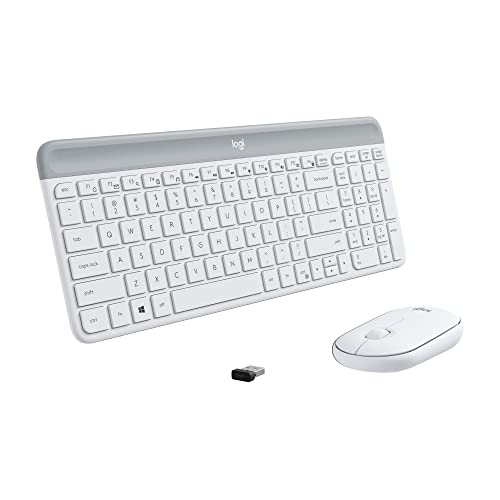
The MK470 Slim trades bulk for a low-profile design, pairing a compact keyboard with scissor keys and a number pad alongside an ambidextrous mouse. Whisper-quiet keys and a lab-tested noise-reduced mouse keep things calm in shared spaces, and an auto-sleep feature conserves battery. A plug-and-play nano receiver with 33 ft of range and Windows compatibility lands it at #8.
CONS
- Slim, compact layout with low-profile scissor keys
- Whisper-quiet keyboard and noise-reduced mouse
- Includes an ambidextrous 3-button mouse
- Auto-sleep feature saves battery
- Plug-and-play nano receiver, up to 33 ft
- Slim, compact layout with low-profile scissor keys
- Whisper-quiet keyboard and noise-reduced mouse
- Includes an ambidextrous 3-button mouse
- Auto-sleep feature saves battery
- No backlighting, unlike the Klim or Aula
- Tuned for Windows rather than multi-OS like the MK850
Our value pick keeps things simple: a full-size keyboard with a built-in wrist rest, an adjustable-DPI mouse, and a 2.4 GHz USB receiver for both. Each device runs on a single AA battery, and a bundled Usb-c adapter widens compatibility across PC, Mac, and laptops. At #9 it's the most affordable complete set on the list, though it's also the heaviest board at about 2.12 lb.
CONS
- Full-size keyboard with built-in wrist rest
- Adjustable-DPI mouse included
- 2.4 GHz USB receiver for the set
- Each device runs on a single AA battery
- Usb-c adapter included for wider compatibility
- Full-size keyboard with built-in wrist rest
- Adjustable-DPI mouse included
- 2.4 GHz USB receiver for the set
- Each device runs on a single AA battery
- Heaviest board here at about 2.12 lb
- No backlighting, unlike the Klim Chroma or Aula 99
The premium choice for enthusiasts, the BlackWidow V4 TKL HyperSpeed brings Razer's ultra-fast 2.4 GHz wireless plus Bluetooth, with the ability to share its dongle with a compatible Razer mouse. Orange tactile switches sit on a hot-swappable PCB compatible with 3- or 5-pin switches, and a stainless-steel plate with tape-enhanced PCB shapes its sound. A multi-function roller and up to 980 hours of battery cap off the #10 spot.
CONS
- HyperSpeed 2.4 GHz plus Bluetooth, multi-device dongle
- Hot-swappable PCB for 3- or 5-pin switches
- Orange tactile switches with steel plate and tape mod
- Multi-function roller and 3 control buttons
- Up to 980-hour battery life
- HyperSpeed 2.4 GHz plus Bluetooth, multi-device dongle
- Hot-swappable PCB for 3- or 5-pin switches
- Orange tactile switches with steel plate and tape mod
- Multi-function roller and 3 control buttons
- No notable drawbacks in the listed feature data
- Tenkeyless layout drops the number pad found on the K270
8 Things to Consider Before Buying Computer Keyboards
A wireless keyboard lives or dies on a few practical details that rarely make the headline. Before you weigh price, think about how you connect, how long the board runs between charges or battery swaps, and whether you need just a keyboard or a full keyboard-and-mouse set. The factors below cover what actually separates these ten.
Our Final Verdict
For most desks, the Logitech K270 Wireless Keyboard wins on the basics that matter daily: full-size comfort, a 2-year battery, and a receiver you plug in once and forget. The Meetion Wireless Keyboard and Mouse is the smart value play, bundling a full-size board, wrist rest, and adjustable-DPI mouse in a single set, though it's the heaviest board here at about 2.12 lb. If you want flagship hardware, the Razer BlackWidow V4 TKL HyperSpeed Wireless Hot Swappable is the premium choice, with Orange tactile switches, a hot-swappable PCB, and up to 980 hours of battery. Spend up only when those extras line up with how you type.
Frequently Asked Questions
What is the best wireless keyboard overall?
Our top pick is the Logitech K270 Wireless Keyboard. It led our comparison of 10 wireless keyboards thanks to a full-size layout with number pad, a 24-month battery life, and a 2.4 GHz receiver that works without any software install. For the tightest budget, the Meetion Wireless Keyboard and Mouse is the best value.
Do I need a keyboard-and-mouse combo or just a keyboard?
It depends on whether you already own a mouse you like. Four of the ten here ship as sets, the Logitech MK540, MK850, MK470, and the Meetion bundle, which means one receiver and one purchase for both devices. If you keep a separate pointer, a standalone board such as the Logitech K270 or MX Keys S keeps your desk simpler.
Which wireless keyboard has the longest battery life?
Among these boards, runtime is measured differently depending on power source. The Logitech MK540 lists up to 36 months on its keyboard and the K270 advertises 24 months, both on replaceable batteries. The Razer BlackWidow V4 TKL HyperSpeed claims up to 980 hours, while the MX Keys S recharges over Usb-c rather than quoting a month figure.
Are there mechanical wireless keyboards in this guide?
Yes. The Redragon K689 PRO is a 108-key gasket-mounted mechanical board with custom linear Mint Mambo switches and three layers of noise dampening. The Razer BlackWidow V4 TKL HyperSpeed uses Orange tactile switches on a hot-swappable PCB compatible with 3- or 5-pin switches. The Aula 99 rounds out the more enthusiast-leaning options with full-key macro programming.
Can these keyboards connect to more than one device?
Several can. The Logitech MX Keys S pairs with up to three devices over Bluetooth Low Energy or a Logi Bolt receiver, the MK850 is multi-device and multi-OS, and the Aula 99 and Razer BlackWidow V4 offer tri-mode switching across 2.4 GHz, Bluetooth, and Usb-c. Simpler boards like the K270 connect to a single machine via one 2.4 GHz receiver.
Which wireless keyboards work with Mac?
A few cover macOS directly. The Logitech MX Keys S supports Windows, macOS, ChromeOS, and Linux, the MK850 spans Windows, macOS, and ChromeOS, the Klim Chroma is compatible with Mac alongside PC, PS4, and PS5, and the Meetion set lists Windows and Mac. Several other Logitech combos here are tuned specifically for Windows, so check the listing first.
Related Guides