Best Motherboards of 2026: 10 Compared

A motherboard quietly dictates everything your build can become: which processor generation drops in, how fast the memory runs, how many drives bolt on. We lined up ten current boards and scored each on socket, power delivery, storage layout, and the connectivity that actually shows up on the spec sheet. The cheap mistake here is overpaying for headroom you will never touch, or underpaying and capping a CPU you already bought.
Build planning starts at the socket, not the price tag. The boards in this guide split across three platforms: Intel LGA 1700 on the Gigabyte Z790 Aorus Elite AX, AMD AM4 on the older B550 trio, and AMD AM5 on the bulk of the lineup, from the Gigabyte B650 Aorus Elite AX up to the Asus ROG Strix X870E-E. Memory generation follows the socket, so DDR4 boards and DDR5 boards aren't interchangeable. That single decision shapes which CPUs, RAM kits, and PCIe generation you can run for years. We pulled the current Amazon spec sheet, imagery, and pricing for all ten boards, then scored each on power-phase design, M.2 and PCIe layout, networking, and how cleanly its socket maps to a real buyer's CPU plans. Higher-ranked boards earned it by stacking genuine capability against cost, not by carrying the longest feature list. What follows is the side-by-side, the spec charts, and a frank read on where each board fits and where it doesn't.
The short version: The Gigabyte Z790 Aorus Elite AX LGA 1700 ATX Motherboard takes the top slot, pairing Intel 14th/13th/12th Gen support with a twin 16+1+2-phase VRM, PCIe 5.0, and four M.2 slots. For the tightest budget, the MSI PRO B550M-VC WiFi ProSeries Motherboard delivers AM4, DDR4, PCIe 4.0, and Wi-Fi 6E in a compact mATX layout.
- Best overall is the Gigabyte Z790 Aorus Elite AX LGA 1700 ATX Motherboard, with Intel 14th/13th/12th Gen support, a twin 16+1+2 VRM, PCIe 5.0, and 4X M.2.
- Best value is the MSI PRO B550M-VC WiFi ProSeries Motherboard, an AM4 mATX board with DDR4, PCIe 4.0, and Wi-Fi 6E.
- Premium pick is the Asus ROG Strix X870E-E Gaming WiFi, listing 18+2+2 power stages, Wi-Fi 7, USB4, and 5X M.2.
- Socket drives everything: one Intel LGA 1700 board, three AMD AM4 boards, and six AMD AM5 boards across the ten compared.
- DDR5 dominates the lineup, but the three B550-based boards stay on DDR4, so match your RAM kit to the board.
Our Top 3 Picks

- Intel LGA 1700 socket for 14th/13th/12th Gen
- DDR5 with XMP 3.0 support
- Twin 16+1+2-phase VRM, 70A stages
- Four PCIe 4.0 x4 M.2 slots
- M.2 Thermal Guard III and covered Mosfet heatsinks

- Ready for Ryzen 9000/8000/7000
- 18+2+2 power stages at 110A each
- Wi-Fi 7 and USB4
- Five M.2 slots with PCIe 5.0
- AI Overclocking, AI Cooling II, AI Networking

- AM4 for Ryzen 3000/5000 and G-series
- WiFi 6E and Intel 2.5Gb Ethernet
- PCIe 4.0 with dual M.2 slots
- 12+2 teamed power stages
- HDMI 2.1 and Bios Flashback
Full Comparison — All 10 Motherboard
| Image | Product | Features | Price |
|---|---|---|---|
Editor's Choice |
| Check Price on Amazon Read Full Review | |
Best Value |
| Check Price on Amazon Read Full Review | |
Premium Pick |
| Check Price on Amazon Read Full Review | |
 |
| Check Price on Amazon Read Full Review | |
 |
| Check Price on Amazon Read Full Review | |
 |
| Check Price on Amazon Read Full Review | |
 |
| Check Price on Amazon Read Full Review | |
 |
| Check Price on Amazon Read Full Review | |
 |
| Check Price on Amazon Read Full Review | |
 | 10Asus TUF Gaming B850-PLUS WiFi AMD AM5 B850 ATX Motherboard |
| Check Price on Amazon Read Full Review |
How They Compare
Top picks — strengths at a glance
Brands compared
The 10 Best Motherboard, Ranked
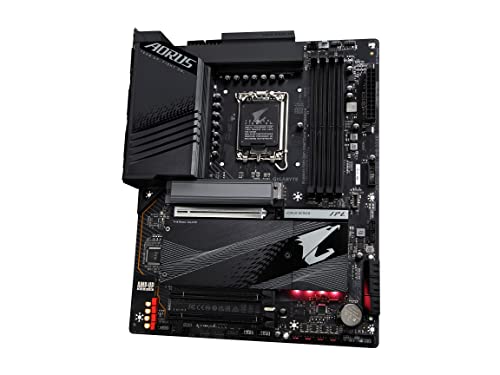
Gigabyte Z790 Aorus Elite AX LGA 1700 ATX Motherboard
- Intel LGA 1700 socket for 14th/13th/12th Gen
- DDR5 with XMP 3.0 support
- Twin 16+1+2-phase VRM, 70A stages
Asus ROG Strix X870E-E Gaming WiFi AMD AM5 X870 ATX
- Ready for Ryzen 9000/8000/7000
- 18+2+2 power stages at 110A each
- Wi-Fi 7 and USB4
Asus ROG Strix B550-F Gaming WiFi II AMD AM4
- AM4 for Ryzen 3000/5000 and G-series
- WiFi 6E and Intel 2.5Gb Ethernet
- PCIe 4.0 with dual M.2 slots
MSI PRO B550M-VC WiFi ProSeries Motherboard
- AM4 for Ryzen 5000 and 3000 Series
- DDR4 up to 4400(OC) MHz
- PCIe 4.0 Lightning Gen4 x4 M.2
Gigabyte B550 Eagle WIFI6 AMD AM4 ATX Motherboard
- AMD Socket AM4 for Ryzen 5000/4000/3000
- Full ATX with two M.2 slots
- Digital twin 10+3-phase VRM
Gigabyte B650 Aorus Elite AX AMD AM5 ATX Motherboard
- AMD Socket AM5 for Ryzen 9000/8000/7000
- DDR5 with Expo and XMP support
- Twin 14+2+1-phase VRM, 70A stages
Asus ROG Strix B650-A Gaming WiFi AMD B650 AM5 Ryzen™
- AM5 for Ryzen 9000/8000/7000
- DDR5 with PCIe 4.0
- One PCIe 5.0 plus two PCIe 4.0 M.2 slots
MSI MAG X870 Tomahawk WiFi Gaming Motherboard
- AM5 for Ryzen 9000/8000/7000
- Built-in USB4 at 40Gbps
- 5G LAN networking
Asus ROG Strix X870-A Gaming WiFi AMD AM5 X870 ATX
- AMD AM5 for Ryzen 7000/8000/9000
- 16+2+2 power stages at 90A each
- Wi-Fi 7 and USB4
Asus TUF Gaming B850-PLUS WiFi AMD AM5 B850 ATX Motherboard
- AMD AM5 for Ryzen 9000/8000/7000
- 14+2+1 80A DrMOS power stages
- Three M.2 slots with PCIe 5.0
8 Things to Consider Before Buying Motherboard
Pick the socket first, because it locks in your CPU family and memory type for the life of the build. From there, weigh the specs buyers actually argue over for motherboards: VRM power-phase count, PCIe generation, M.2 slot count, and networking. Our ranking already balances those trade-offs against price, so a higher pick simply scored stronger for the money.
Our Final Verdict
The Gigabyte Z790 Aorus Elite AX LGA 1700 ATX Motherboard is our overall winner, the rare board where Intel 14th/13th/12th Gen support, a twin 16+1+2 VRM, PCIe 5.0, and four M.2 slots line up at a sensible spot in the lineup. On a budget, the MSI PRO B550M-VC WiFi ProSeries Motherboard is the smart spend, bringing AM4, DDR4, PCIe 4.0, and Wi-Fi 6E in a compact mATX board. If you want the deepest feature set and are building around current Ryzen, the Asus ROG Strix X870E-E Gaming WiFi is the premium pick, with 18+2+2 power stages, Wi-Fi 7, USB4, and five M.2 slots. None of these are wrong choices; they simply target different sockets and budgets.
Frequently Asked Questions
What is the best motherboard overall?
The Gigabyte Z790 Aorus Elite AX LGA 1700 ATX Motherboard is our top pick of the ten compared. It supports Intel Core 14th/13th/12th Gen processors, runs a twin 16+1+2-phase VRM with 70A power stages, and offers PCIe 5.0 plus four M.2 slots, which is why it edged out pricier boards in our ranking.
Which motherboard is best on a budget?
The MSI PRO B550M-VC WiFi ProSeries Motherboard is the value pick. It supports AMD Ryzen 5000 and 3000 Series CPUs on AM4, runs DDR4 up to 4400(OC) MHz, and includes PCIe 4.0, a Lightning Gen4 x4 M.2 slot, and Wi-Fi 6E in a compact mATX layout.
Should I get an AM4 or AM5 motherboard?
It depends on your CPU plans. AM4 boards here, like the Asus ROG Strix B550-F and Gigabyte B550 Eagle, run Ryzen 5000/3000 (and 4000/4000 G-series on some boards) on DDR4. AM5 boards, like the Gigabyte B650 Aorus Elite AX and MSI MAG X870 Tomahawk, target Ryzen 9000/8000/7000 on DDR5 and add newer features such as PCIe 5.0 and Wi-Fi 7. Pick AM5 if you want the current Ryzen generation and DDR5.
Do I need PCIe 5.0 on my motherboard?
Only if you plan to use the fastest current drives or graphics. PCIe 5.0 appears on the Gigabyte Z790 Aorus Elite AX, B650 Aorus Elite AX, Asus ROG Strix B650-A, Asus ROG Strix X870E-E, MSI MAG X870 Tomahawk, ROG Strix X870-A, and TUF B850-PLUS. The B550-based boards top out at PCIe 4.0, which is still plenty for most builds.
Which motherboard has the strongest power delivery?
The Asus ROG Strix X870E-E Gaming WiFi lists the most aggressive design, with an 18+2+2 power solution rated for 110A per stage and dual ProCool II power. The Gigabyte Z790 Aorus Elite AX follows with a twin 16+1+2 layout using 70A power stages, making both strong matches for high-core processors.
Which boards include Wi-Fi 7?
Four boards in this guide list Wi-Fi 7: the Asus ROG Strix X870E-E, MSI MAG X870 Tomahawk, Asus ROG Strix X870-A, and Asus TUF Gaming B850-PLUS. Several others, including the Gigabyte Z790 Aorus Elite AX and ROG Strix B550-F, carry WiFi 6E instead.